Track input hit, input miss, output tokens, and estimated spend by project.
Open-source AI work operating system for Windows
Run AI work from prompt to deliverable, not just prompt to answer.
Open Deskmate brings OpenClaw-style capabilities, chat, build automation, multi-agent workflows, connector routing, project budgets, Workboard tracking, Git review, screenshots, notes, documents, and reusable workflows into one local-first desktop app that runs with your own provider keys for people doing real client, product, and project work.
Designed for accountable AI work
Prompt to project
One app for the work around the agent.
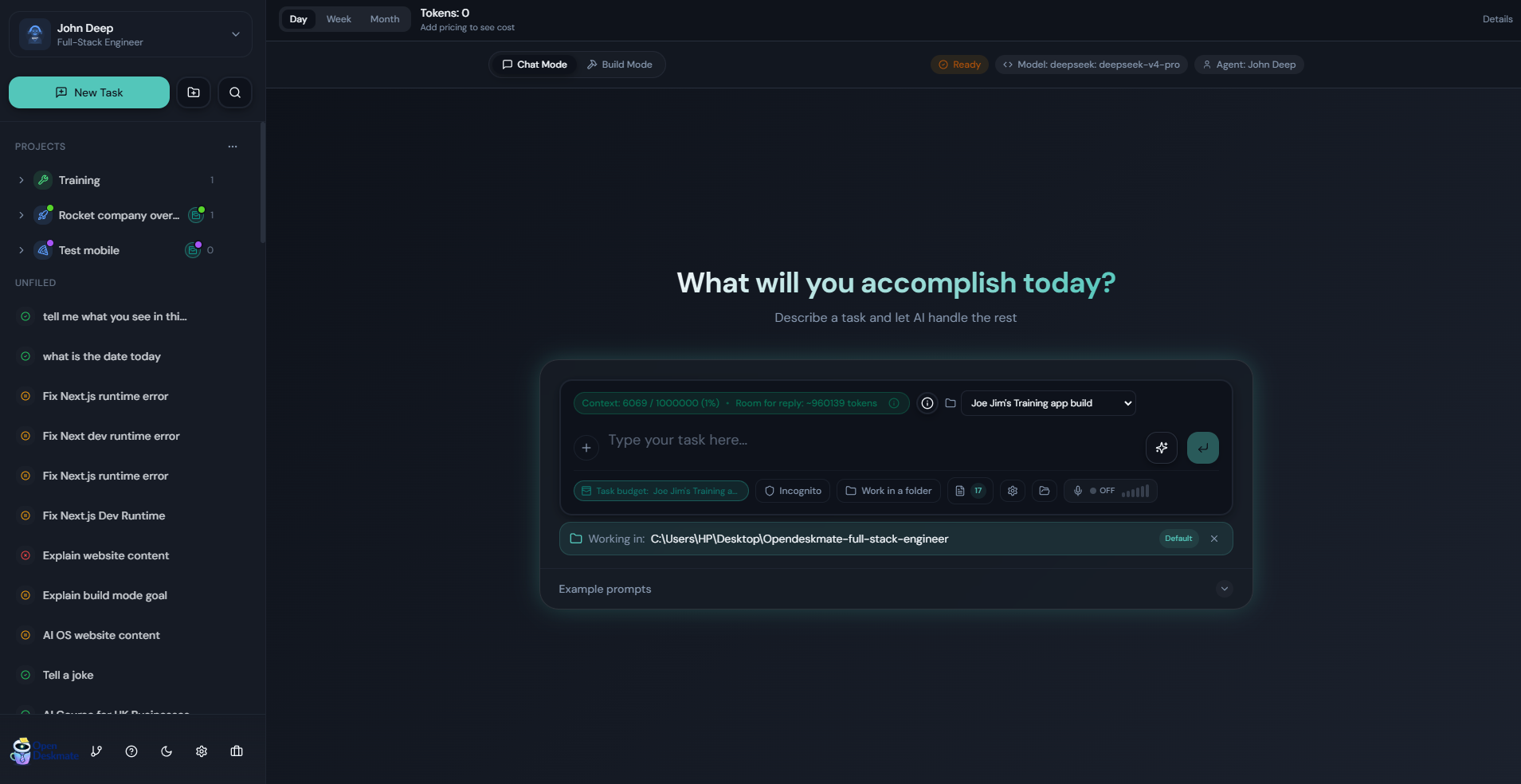
Move from chat to build work, then track budgets, files, Git changes, notes, screenshots, documents, and follow-up tasks without changing tools.
Review files, capture previews, save answers, manage work items, and push updates with guided Git flows.
Chat Mode
Project tracking
Budget
Workboard
Git review
From agent harness to work system
Built to make AI work visible, reusable, and billable.
Most agent tools focus on running the model. Open Deskmate focuses on the whole working loop around the model: project context, cost tracking, file changes, Git status, screenshots, notes, documents, and follow-up work.
It offers OpenClaw-style capabilities including multi-agent workflows, connector routing, automation loops, tool-driven execution, and tracked subagent orchestration, but with a full desktop settings UI instead of CLI-only setup. Run locally with your own provider keys, configure models, permissions, connectors, plugins, and automation from the app, and install directly on Windows with an installer or portable executable without depending on a hosted Open Deskmate cloud service.
Open source (MIT)
Runs from your desktop
Bring your own providers
Multi-agent workflows
Connector routing
Automation loops
Tool-driven execution
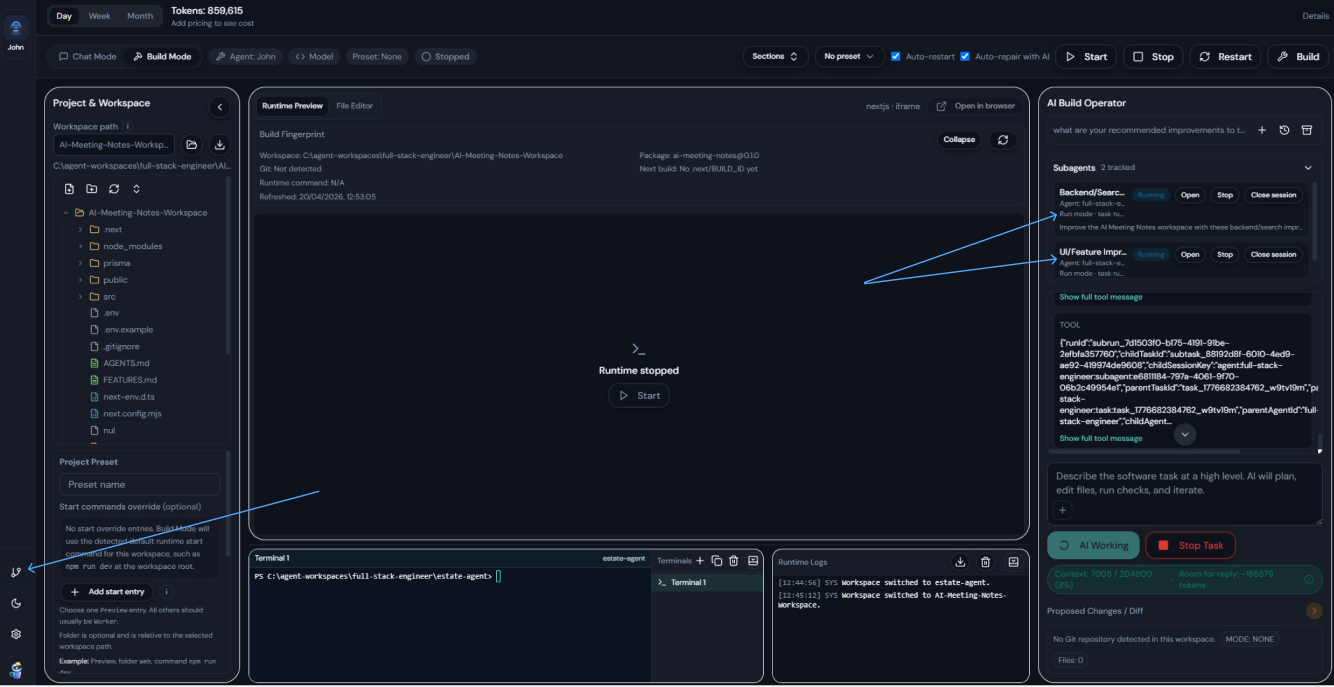
Tracked subagents
No app cloud required
Per-project costs
Beginner-friendly Git
Project workboard
Windows downloads
Download Open Deskmate from GitHub Releases.
Windows builds are published on GitHub Releases. Choose the installer for the standard setup flow or the portable executable if you want to run the app without installing it.
Recommended
Windows Installer
Best for most users who want the normal install flow and desktop integration.
No install
Portable EXE
Run Open Deskmate directly if you prefer a portable Windows build without installation.
Installer note: The Windows installer for this prerelease is not yet code-signed, so Windows may show a warning before installation or launch. That is expected for this build. If you prefer to avoid the installer, the portable version is also available.
On the GitHub release page, click the Assets section to expand the available downloads.
Looking for older versions or the full asset list? Browse all GitHub Releases.
What it does
An AI workspace for doing the work, tracking the work, and handing it off.
Open Deskmate is built for practical AI work that has a project, a cost, files, decisions, notes, screenshots, and follow-up tasks. It combines conversational help, workspace-aware build flows, project management, Git review, and local-first operation in one interface.
Run AI against real work
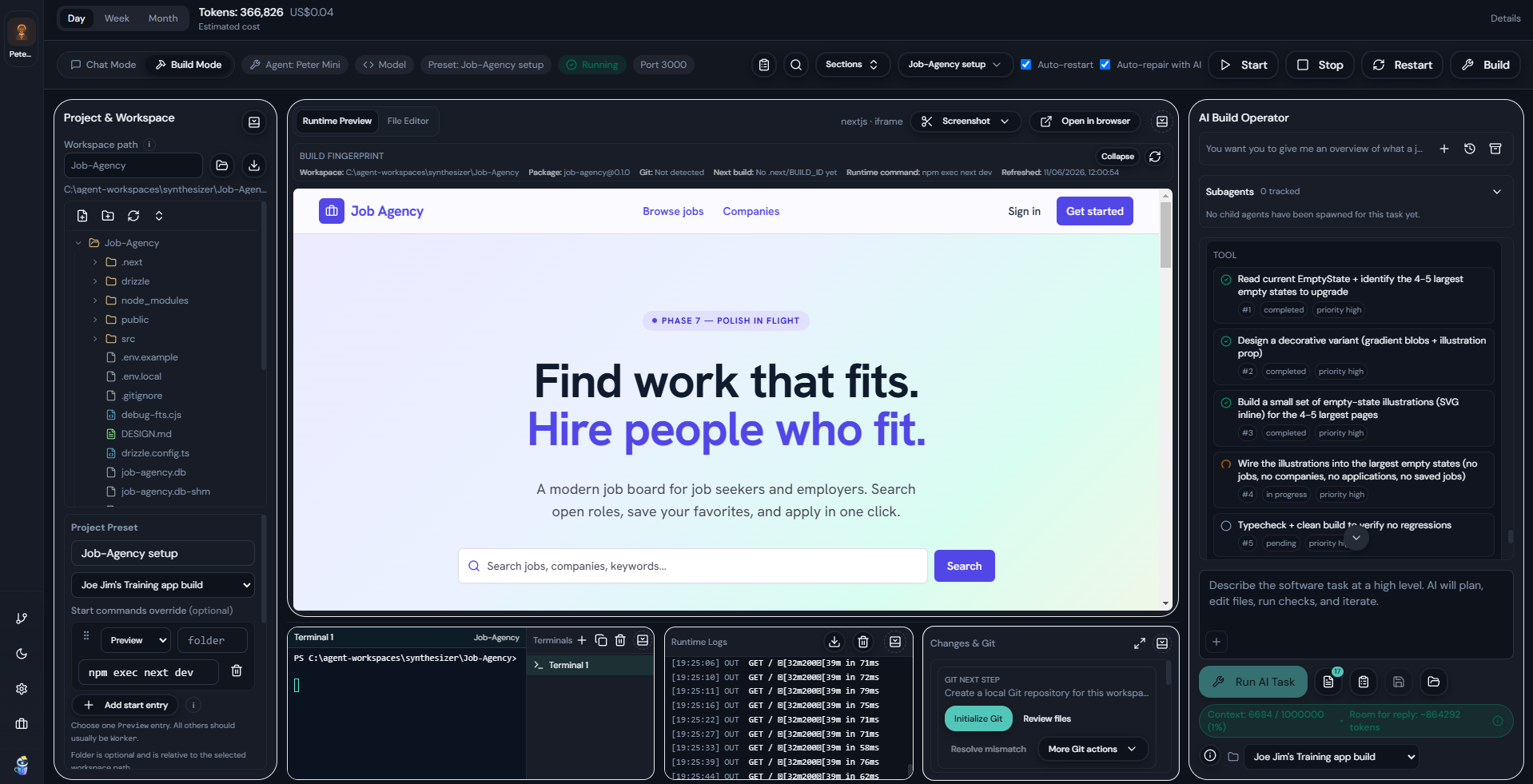
Use Chat Mode for research and task conversations, then switch to Build Mode when the job needs a workspace, runtime preview, terminal, logs, file tree, and Git review.
Track cost by project
Attach Chat projects, tasks, Build presets, and sessions to a budget project so input hit, input miss, output tokens, and estimated costs stay visible.
Turn answers into assets
Save answers as rich notes or RTF files, attach documents to work items, capture annotated runtime screenshots, and keep useful output tied to the project.
Works with your setup
Built around common AI providers and the connector catalog already in the app.
Open Deskmate is designed to work with the providers and workflow surfaces people already use.
Providers
OpenAI
Anthropic
Google
xAI
Ollama
OpenRouter
 Kimi
Kimi

Kimi
Messaging Connectors
Discord
Telegram
BlueBubbles
Google Chat
iMessage
LINE
Matrix
Mattermost
Microsoft Teams
Nextcloud Talk
Nostr
Signal
Slack
Tlon
WhatsApp
Zalo OA
Zalo User
App Connectors
Notion
Trello
Obsidian
GitHub
Slack
Dropbox
Canva
OneDrive
Supabase
Google Slides
Google Tasks
Google Sheets
Google Docs
Google Drive
Google Photos
Google Maps
YouTube
Figma
Miro
Gmail
Email Triggers
Google Calendar
Microsoft Outlook
Why it's different
More than a model runner or agent harness.
Open Deskmate keeps the power of local agent workflows, but adds the project, cost, review, and handoff layers that make AI work easier to trust, repeat, and use for real delivery.
Manages the work around the agent
Most tools stop at the answer or file edit. Open Deskmate keeps project budgets, work items, notes, documents, screenshots, Git state, and exports connected to the task.
Built for client and project accountability
Track usage by project, see input hit/miss/output costs, set budget windows, assign people, and understand which Chat projects or Build presets created the spend.
Beginner-friendly Git review
Changes & Git explains repository state, changed files, branch sync, remotes, commit, push, and mismatch recovery in a workflow built for people who do not live in Git all day.
Local-first with visible controls
Use your own providers, local workspaces, UI-managed permissions, saved prompts, schedules, connectors, plugins, and Help docs without turning normal operation into hidden config.
AI work operating system
The new pieces make Open Deskmate useful after the answer arrives.
For freelancers, agencies, consultants, builders, and small teams, the hard part is not only getting an AI answer. It is keeping the cost, files, decisions, screenshots, notes, tasks, and client handoff organized.
Project costs
Per-project budgets
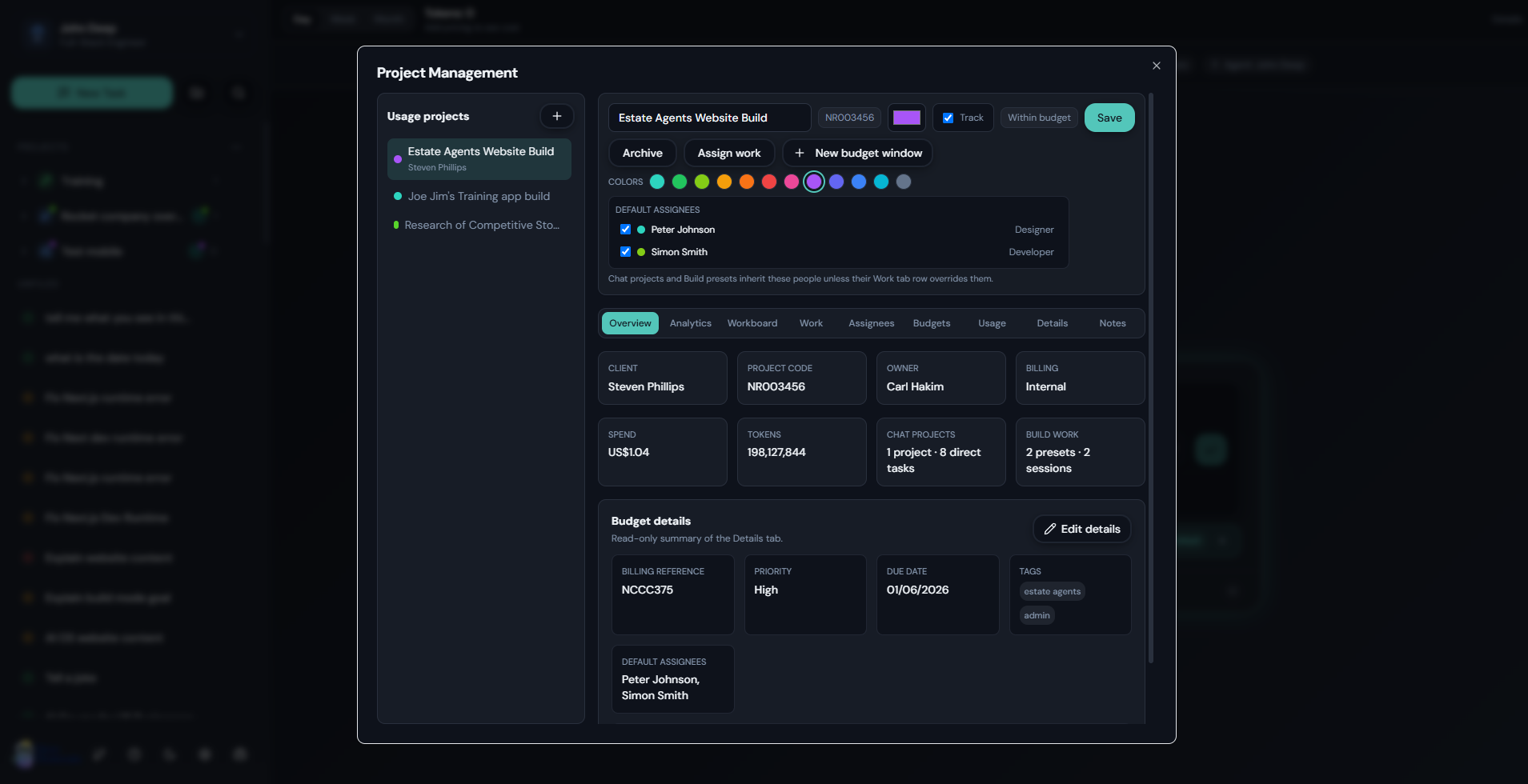
Create usage projects, attach Chat projects and Build presets, and track input hit, input miss, output tokens, estimated cost, budget windows, warning limits, and blocking limits.
Work tracking
Workboard built around AI output
Turn work into Table, Kanban, Timeline, and Calendar views with states, checklists, assignees, due dates, rich notes, drawings, documents, and progress tracking.
Git review
Changes & Git for non-experts
See edited files, total additions/deletions, branch status, remote/upstream state, commit and push guidance, remote setup, mismatch recovery, and conflict help.
Visual feedback
Runtime screenshots with annotation
Capture a selected area or full runtime preview, mark it up with shapes, arrows, lines, text, colors, and thickness controls, then attach, export, or save it to project work.
Knowledge capture
Save answers where work happens
Copy rich answers, pop them out for reading, save them as formatted project notes, export RTF files, and attach saved files to the right project work item.
Repeatability
Recipes, prompts, activity, and recovery
Reuse prompt recipes, manage saved prompt categories, inspect activity timelines, separate reasoning from answers, and recover when an agent stops without a useful final answer.
Key features
Everything needed to move from idea to finished work.
Chat Mode and Build Mode
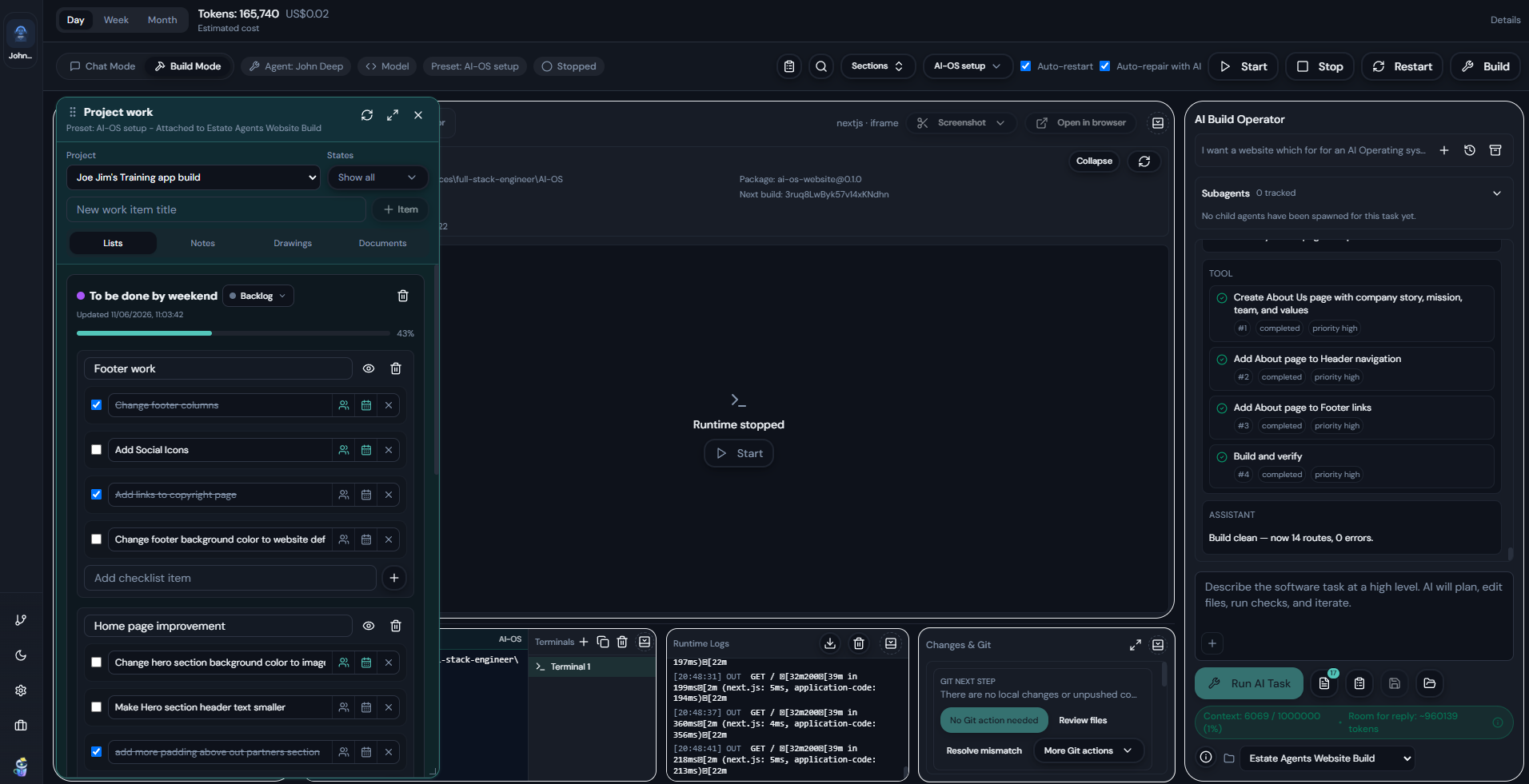
Start with normal task conversations, then switch into a workspace-aware build surface with runtime preview, file tree, logs, terminals, screenshots, and task history.
Project Management
Create usage projects with client details, owners, assignees, notes, budget windows, analytics, work contents, and active project status.
Usage analytics and budgets
Track spend over time, token mix, model usage, input hit/miss/output costs, and budget health by project instead of only globally.
Build review and Git
Review edited files, run checks, inspect Git status, commit with a message, push, create branches, add remotes, and resolve mismatch states from the UI.
Reusable workflows
Use saved prompts, bundled recipes, categorized prompt libraries, natural-language automation drafting, schedules, plugins, skills, and markdown Help docs.
Local-first control
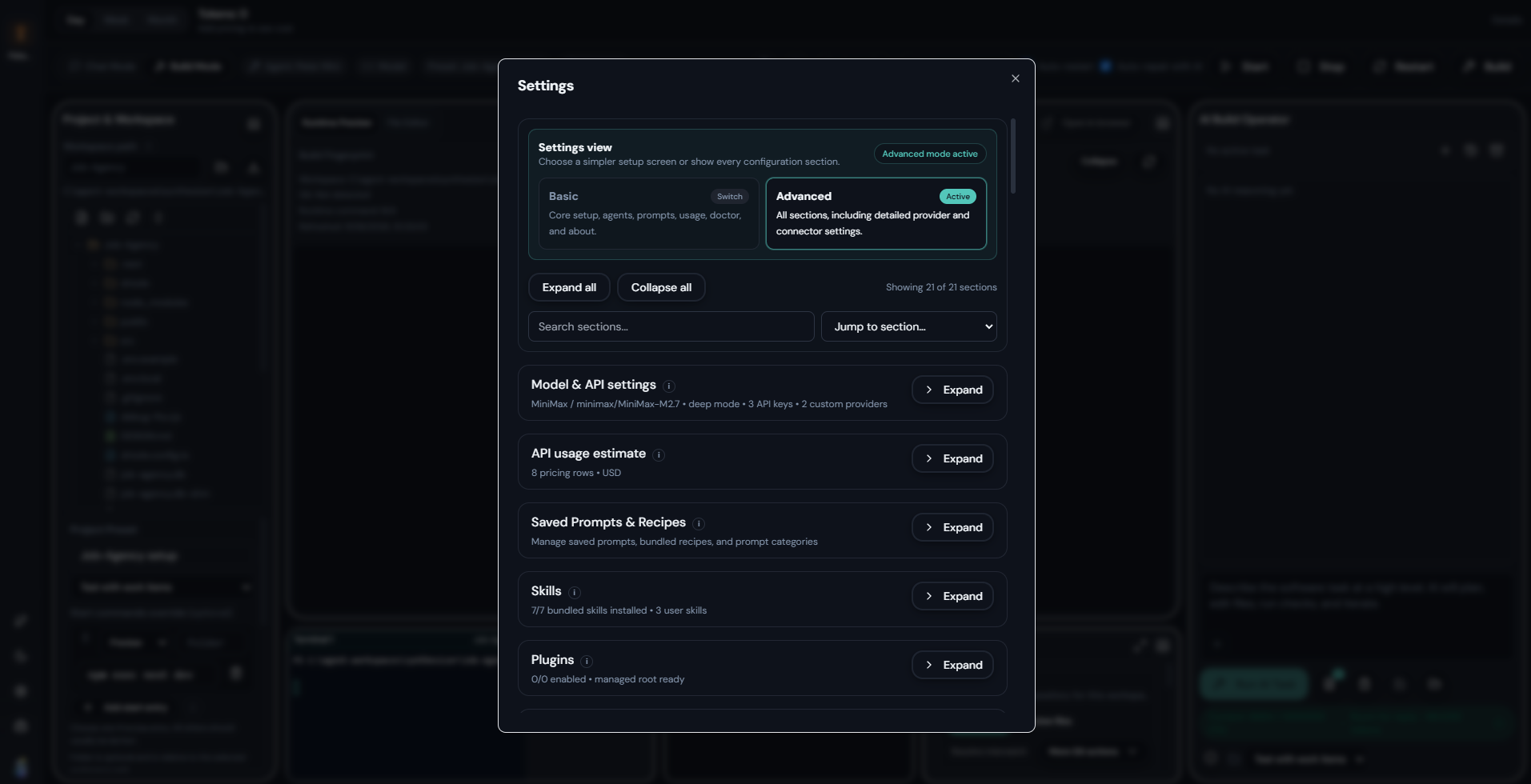
Bring your own providers, manage models and permissions from Settings, work against local folders, and keep day-to-day AI work visible from the desktop.
How it works
A simple loop for accountable AI work.
The product is designed around the whole job: start the task, do the work, review what changed, then save the useful output back into the project.
Step 1
Choose the task and project
Start in Chat Mode or Build Mode, choose the agent and model, and attach the work to a project budget when cost or client tracking matters.
Step 2
Run, inspect, and guide the agent
Watch activity, review tool use, capture screenshots, inspect logs, use saved prompts, and keep the task grounded in the selected files or workspace.
Step 3
Review, save, and hand off
Use Changes & Git for files, save answers as notes or RTF files, attach documents to work items, and track follow-up work on the Workboard.
Screenshots
See the core product surfaces.
The app is designed around a few clear working modes so you can stay oriented while tasks, settings, and child-agent runs remain visible.
Use cases
Built for people who need AI work to become organized project work.
Open Deskmate is strongest when AI work has a client, budget, repository, task list, due date, screenshot, note, or deliverable attached to it.
Freelancers and agencies
Track client AI costs, save outputs to project work items, manage deliverables, and keep notes, files, screenshots, and Git updates tied to the right budget.
Consultants
Prepare reports, research, client notes, RTF exports, reusable prompt recipes, and project-specific usage summaries from one desktop surface.
Solo builders
Use Build Mode for real repositories, preview screenshots, beginner-friendly Git actions, runtime logs, terminals, and AI-generated code changes.
Knowledge workers
Turn research, notes, drafts, images, documents, and follow-up actions into saved project knowledge instead of leaving them buried in chat history.
Small technical teams
Assign people to budgets, track Chat projects and Build presets, review work item progress, and understand project usage across sessions and tasks.
Open-source contributors
Explore the codebase, test workflows, improve Help docs, and shape a desktop AI tool focused on practical work rather than hidden agent plumbing.
Get started
Start with the repo, then build or run locally.
Open Deskmate is served through the repository and designed to be straightforward to evaluate from source.
- Open the repository. Review the README and installation notes on GitHub.
- Install dependencies. Use Node.js 20+ and pnpm 9+.
- Run development or build the app. Start locally with `pnpm dev` or package for Windows with `pnpm -F @accomplish/desktop build:win`.
- Configure your providers in the app. Add your own keys and tune models, permissions, and agents from the settings UI.
FAQ
Questions people are likely to ask first.
What makes Open Deskmate different from other agent harnesses?
It manages the work around the agent: project budgets, Workboard items, notes, documents, screenshots, Git review, saved prompts, activity timelines, and exports.
Who is it for?
It is built for freelancers, agencies, consultants, solo builders, knowledge workers, and small teams who want AI work tied to real projects and deliverables.
Can it track AI costs by project?
Yes. Project budgets can track input hit, input miss, output tokens, estimated costs, budget windows, warn-only limits, and optional blocking limits.
Does it help with Git?
Yes. Changes & Git shows repository status, changed files, additions/deletions, branches, remotes, commit/push actions, and mismatch or conflict guidance.
Does it run locally?
It is designed as a local-first desktop app. You configure your own providers and operate against local workspaces from the desktop UI.
Is Open Deskmate open source?
Yes. The project is open source and contributor-friendly, with the product direction focused on practical desktop AI work.
Open source
Built in public and open to contributors.
Open Deskmate is an MIT-licensed project. Contributions are welcome, especially from early users who care about making desktop AI more usable, project-aware, cost-aware, and grounded in practical work.
Contribute
Fork the repository, create a feature branch, and open a pull request against main.
Follow development
Explore the codebase, screenshots, Help docs, project-management workflows, Git review surface, and evolving desktop AI work system directly in the repository.
View repositoryGet involved
Explore the repo, try the desktop app, and help shape the AI work operating system.
Open Deskmate is early enough to be shaped by contributors and practical users, but already focused on a clear gap: managing real work before, during, and after the AI runs.
Contact
Questions, collaborations, or early contribution interest?
Reach out directly if you want to talk about the product, contributing, or how Open Deskmate is evolving into a practical desktop AI work operating system.